Infinity Tools
Free editionManagement of Linux servers - finally simple!
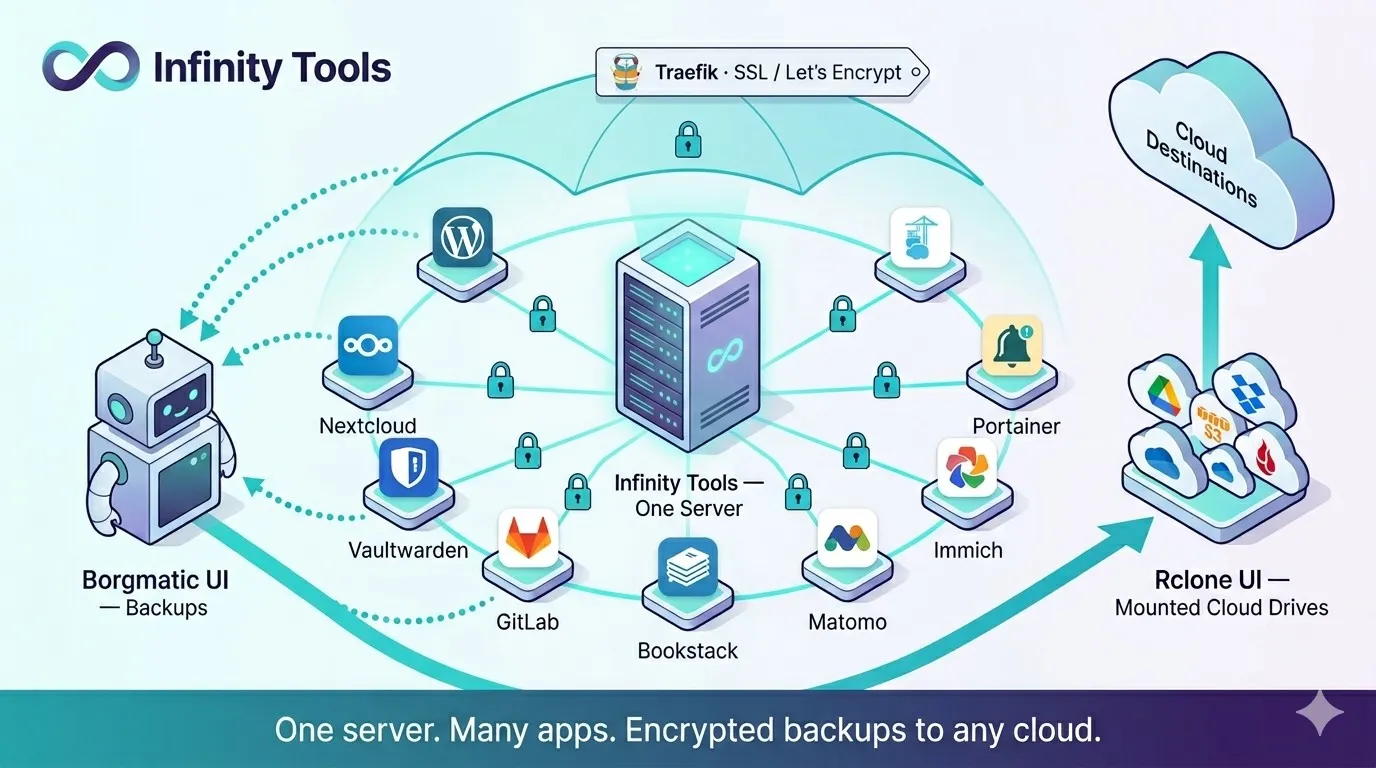
A script suite with an intuitive terminal UI that installs and manages 30 self-hosted applications on your own servers — with Docker, a reverse proxy, automatic SSL, firewall hardening and encrypted backups configured correctly the first time. Professional backup software with UI included (Borgmatic UI).
Perpetual license · 1 year of updates · Free edition for personal use
See it working
11 views · scroll or swipeEverything starts here. Infinity Tools is a menu you arrow through over SSH — applications, Docker, disks, security and access, backups, health, performance and updates. No YAML to learn, no playbooks to maintain.
The gap this fills
Standing up a production server by hand is a day of work you will repeat slightly differently every time. Docker, a reverse proxy, certificates, firewall rules, fail2ban, backups, monitoring — none of it is difficult, and all of it is easy to get subtly wrong.
The usual answer is a configuration-management tool. Ansible is excellent and has a steep learning curve, and writing playbooks for a handful of servers is often more work than the servers.
Infinity Tools sits in the middle. It is a script suite with a terminal UI: you pick an application from a menu, answer a few questions, and it is installed the way a careful sysadmin would have installed it. Anyone with basic Linux skills can run it. Nothing has to be learned first.
What you get on day one
Thirty applications, each installed with its reverse proxy entry, a Let’s Encrypt certificate that renews itself, network isolation, and a place in the backup schedule.
Password management with Vaultwarden or Passbolt — the things people usually pay per-seat for, with no seat limits. File sync and collaboration with Nextcloud. Photos with Immich. Document signing with DocuSeal, so contracts stop going through a third party. VPN access with WireGuard, and an SSH and database bastion with Warpgate. Monitoring with Netdata and Uptime Kuma. Source control with GitLab. Publishing with WordPress, analytics with Matomo, documentation with BookStack.
All of it on hardware you control, with no subscription and no per-user pricing.
The two you will not find anywhere else
Most of the catalogue is well-known open source, installed properly. Two are ours, and they are the reason most people stay.
Borgmatic UI turns Borg — the best backup engine available and one of the least approachable — into something a team can operate. Files, databases, and in the commercial edition entire Git repositories and Microsoft SQL Server. Archives you can browse. Restores you can trust.
Rclone UI does the same for cloud storage: 70+ providers configured through a wizard instead of a hand-edited config file, mounted persistently as ordinary folders.
Together they cover the two jobs that most often get postponed until the week after they were needed.
Where the commercial edition differs
Community is free for private use on up to three servers, with every application included and both UIs in single-server mode. It is a real edition, not a demo.
The commercial editions add what matters once other people are depending on you: Director mode for running a fleet from one console, Git repository backup, Microsoft SQL Server and Azure SQL, AWS IAM for pull-based cloud backups, and DocuSeal Plus.
What you get
A terminal UI, not a config language
Everything runs through a clear menu-driven interface over SSH. No YAML to learn, no playbooks to maintain, no coding required.
Correct by default
Each application arrives with its reverse proxy entry, TLS certificate, isolated Docker network and backup schedule already wired up — the steps that are easy to skip and expensive to forget.
Security you would otherwise bolt on later
Fail2ban, firewall configuration and hardening are applied as part of the install, not left as an exercise.
Backups that can actually be restored
Borgmatic UI ships with it: encrypted, deduplicated, versioned backups of files and databases, with a restore path someone other than you can follow.
Cloud storage as a local drive
Rclone UI mounts any of 70+ providers as a folder — which means you can back it up, serve from it, or migrate between providers.
Shell scripts you can read
No compiled black box. The code is transparent shell script you can inspect before you run it as root, on standard Linux or Windows WSL2.
Community
For personal, non-commercial use on up to three servers.
- One-command install for 30+ self-hosted applications
- Borgmatic UI in standalone and client mode
- Rclone UI for a single server, 70+ storage providers
- Database backups — PostgreSQL, MySQL, MariaDB, MongoDB, SQLite
- Notifications via Apprise (100+ services) and ntfy
- + 3 more →
Community license. Private use only, machine-ID bound.
Pro
Commercial use on a single server.
- Everything in Community, licensed for commercial use
- Borgmatic UI with Git repository backup — protect your crown jewels on your own hardware
- Borgmatic UI with Microsoft SQL Server and Azure SQL backup
- AWS IAM support for pull-based cloud backups
- DocuSeal Plus
- + 1 more →
Perpetual license — never expires. Includes one year of updates and support.
Business
Most popularCommercial use across three servers, with fleet management.
- Everything in Pro, across three servers
- Borgmatic UI Director — manage backups across the whole fleet
- Rclone UI Director — multiple Rclone instances from one console
- Infinity Director — install and upgrade apps across every server
- Netdata Director for multi-server monitoring
- + 1 more →
Perpetual license — never expires. Includes one year of updates and support.
Enterprise
Commercial use across ten servers.
- Everything in Business, across ten servers
- Suited to larger estates and mixed on-prem and cloud infrastructure
- One year of updates and support
Perpetual license — never expires. Includes one year of updates and support.
Or install it straight from the terminal
The Community installer registers you itself — it asks for your email address and country at the prompt instead of sending you to a web form, so you never leave the shell. The license key still arrives by email once you confirm the address, and the installer waits for it. Needs root.
curl -fsSL "https://speedbits-releases.fsn1.your-objectstorage.com/infinity-tools/latest/infinitytools-community-installer.sh" -o /tmp/infinitytools-installer.sh && sudo bash /tmp/infinitytools-installer.sh && rm -f /tmp/infinitytools-installer.shNeed more servers, several products, or an invoice? Ask for a quote. Lost a license key? Retrieve it here.
Try Infinity Tools on one machine and see.
The free edition is the same software, limited to personal use.